CLI StudiosCLI Studios
Five usability problems, one root cause: modals had eaten the architecture.5 つの使いにくさの根は一つ。モーダルが構造を飲み込んでいた。
Challenge課題
CLI Studios' dance-education app had collapsed under its own modals. Five distinct usability problems — indistinguishable content types, confusing navigation, no way back — looked separate, but traced to one root cause: over-reliance on modal views had collapsed the information architecture.CLI Studios のダンス教育アプリは、モーダルの重なりで機能不全に陥っていた。コンテンツの見分けがつかない、迷子になる、戻れない。見た目は 5 つの別々の不満だったが、たどると原因は 1 つ。モーダルへの依存が情報構造そのものを壊していた。
Solution解決
A heuristic evaluation against Nielsen's 10 principles, then user interviews, confirmed every problem was a symptom of the same flaw. I eliminated modals entirely, rebuilding around four peer sections — Home, Discover, Library, My Pick — with full-page views and consistent back navigation, and closed with a 13-page, 125+ component design system so the fix outlives the redesign. The redesign and the system were delivered to CLI Studios' product design team and have not been implemented; the system is built so that, once it is, screens reuse documented components instead of being rebuilt one by one.Nielsen の 10 原則によるヒューリスティック評価と、それを裏づけるユーザーインタビューを行った。5 つの不満はすべて同じ構造欠陥の症状だと分かった。モーダルを全廃し、Home・Discover・Library・My Pick という 4 つの対等なセクションに組み直した。全画面表示と一貫した戻る導線に置き換え、最後に 13 ページ・部品 125 超のデザインシステムにまとめた。再設計とシステムは CLI Studios のプロダクトデザインチームに納品したが、実装には至っていない。実装されれば、画面ごとに作り直すのではなく、文書化した部品を使い回せる作りにしてある。
Impactインパクト
I eliminated modals and rebuilt CLI Studios around four peer dashboards after Nielsen review and interviews.Nielsen 評価とインタビューの後、モーダルを廃し四つのピアダッシュボードへ再設計した。
What I handled担当フェーズ
- Researchリサーチ
- Business / Strategyビジネス/戦略
- Conceptコンセプト
- UX / UIUX/UI
- Design Systemデザインシステム
- Prototypeプロトタイプ
- Build実装
- Launch / Growthローンチ/グロース
The diagnosis, on paper 紙の上の診断
Heuristic evaluation against Nielsen's 10 principles surfaced five problems; interaction-flow mapping showed why the IA felt broken. From the UI you could not tell a course from a single video — every type looked the same on the way in. Nielsen の 10 原則によるヒューリスティック評価で 5 つの問題が浮かび上がり、操作の流れの図が情報構造の破綻を示した。画面ではコースと 1 本の動画の区別がつかず、どの種類も入り口は同じに見えた。
.png)
.png)
.png)
.png)
.png)
.png)
.jpg)
My key move: three content types that look different at a glance 自分の一手:一目で違う見た目の 3 コンテンツ種別
- Learning Paths
- Classes
- Playlists
Four peer sections (Home, Discover, Library, My Pick) replace the modal stack — but the breakthrough was giving Paths, Classes and Playlists visibly different UI. Tap a sketch to open it full size. Home・Discover・Library・My Pick の 4 セクションでモーダルの積み重ねに代わる。ただし決め手は、Path・Class・Playlist を見た目の違う UI にしたこと。スケッチをタップすると原寸で開く。
From sketch to every core screen スケッチから、主要画面すべてへ
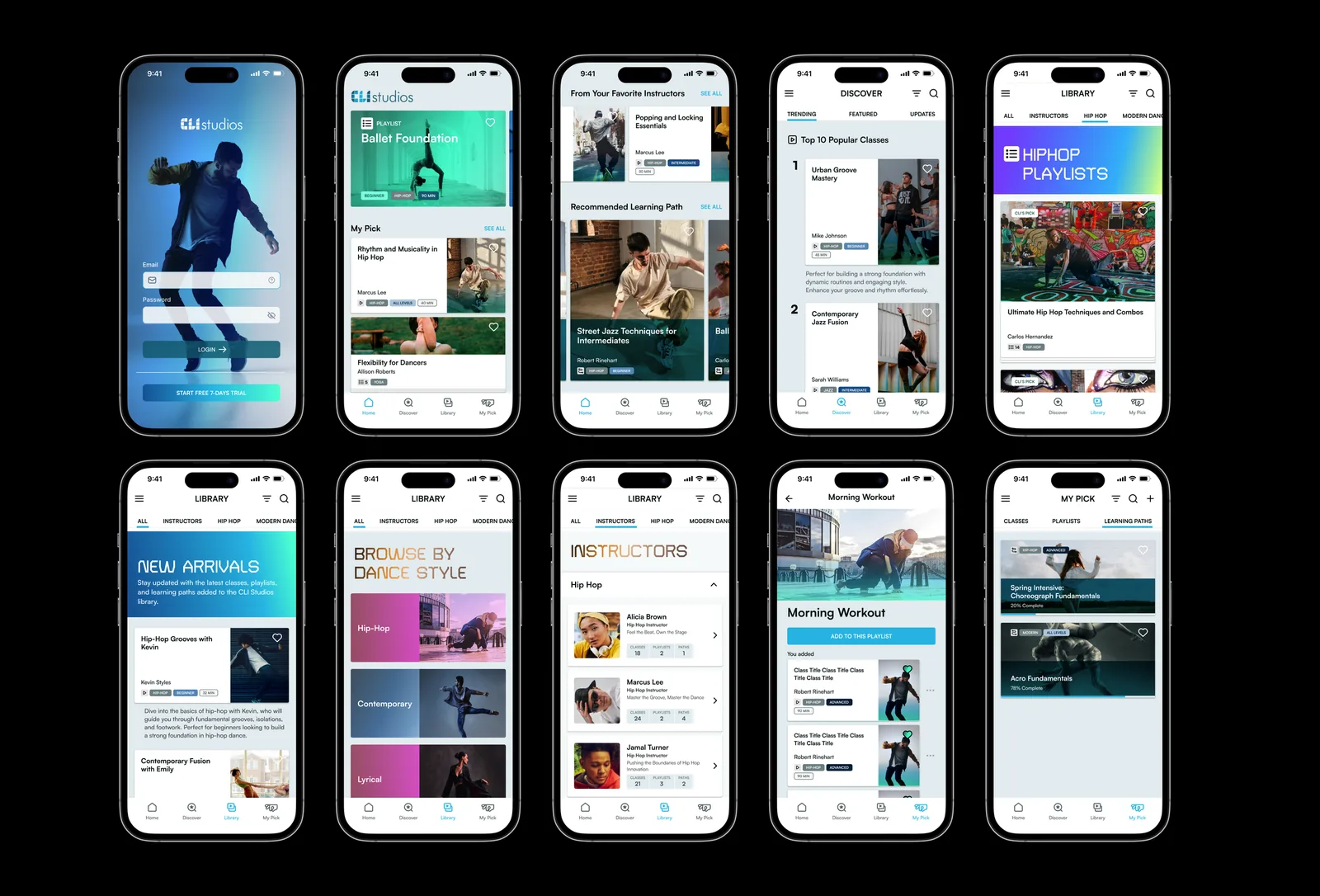
Login, Home, Discover, Library, My Pick — full-page views with distinct cards per content type and a back control that always means something. ログイン、Home、Discover、Library、My Pick。種類ごとに異なるカードの全画面表示に組み直し、戻る操作は常に意味のある場所へ戻る。

Every core screen, before and after 主要画面を、全て前後で並べる


.png)

The design system that outlives the screens 画面より長く残るデザインシステム
Thirteen pages document 125+ components, interaction patterns and accessibility specs — delivered alongside the redesign so future builds reuse instead of reinvent. 全 13 ページに、部品 125 超・操作パターン・アクセシビリティ仕様を記録した。再設計と同時に納品し、次の実装が一から作り直さず使い回せるようにした。
13 pg
design system delivered alongside the redesign全 13 ページのデザインシステム
125+
components, interaction patterns and a11y specs documented部品・操作パターン 125 超を記録


